<?xml version="1.0" encoding="utf-8"?>
<?xml-stylesheet type="text/xsl" href="/css/simple-atom.xslt"?>
<feed xmlns="http://www.w3.org/2005/Atom">

  <title>Death.au's Domain posts tagged Development</title>
  <subtitle>Thoughts, stories and ideas.</subtitle>
  <link rel="self" href="https://www.death.id.au/tag/development/atom.xml" type="application/atom+xml" />
  <updated>2026-08-22T13:10:10Z</updated>
  <author>
    <name>Death.au</name>
  </author>
  
  <id>https://www.death.id.au/tag/development/</id>

  
  <entry>
    <title>My new website (again)  - 11ty+Friendica</title>
    <id>https://www.death.id.au/b4.0017/</id>
    <updated>2025-09-22T00:33:00Z</updated>
    <published>2025-09-22T00:33:00Z</published>
    <content type="xhtml"><div xmlns="http://www.w3.org/1999/xhtml"><h1>My new website (again) - 11ty+Friendica</h1>
<p>So, I've re-jiggered my website <em>again</em>, and moved away from Ghost, back to 11ty. As I mused in a <a href="/B4.0016">previous blog post</a>, I wanted a simpler ActivityPub id, and more control over the handle (i.e. the ability to use <code>death.au</code> as the preferred username). I already had that in a self-hosted Friendica instance, but if I moved that to my main domain, that would prevent my website from showing up at the main domain. Well, with a little help from Cloudflare, I've managed to work around that.</p>
<p>I wanted to write about what I've set up here. I'll start with the basic part:</p>
<h2>Eleventy static website</h2>
<p>I've used 11ty in the past, and I really like the flexibility it gives me in the output. I can keep my pages and articles as simple markdown, or go for an all out html bonanza and 11ty will assemble the pieces and spit out html files (or other kinds of files) for me, so I end up with a collection of files that can just be served on the web in the most basic of manners.</p>
<p>Also, it allows me to set up page metadata for routing. I've got a URL scheme of my own I'm using, very loosely inspired by Johnny Decimal, whereby all my blog posts are at <code>/b4.xxxx</code> (where <code>xxxx</code> is just an incremental id). I've also got some small portfolio pages (that I still want to expand on) under <code>cv.yy</code> and short-form microblog-style posts under <code>/n.zzzzzzzz</code>(where <code>zzzzzzzz</code> is actually a base 36 encoded timestamp). Alongside some other things like a summary and featured images (if applicable) I have a lot of control, with very little markup.</p>
<p>Setting up hosting for the pages is simple on Cloudflare. I set up a pages project pointing at my 11ty repo, tell it what command to use to build and what folder the resulting files will be in to upload and now every time I commit and push, my website is automatically built and published. I'm already using Cloudflare's DNS, so it's trivial to point <a href="https://www.death.id.au">https://www.death.id.au</a> to this pages project and my website is good to go.</p>
<h2>Friendica for the Fediverse</h2>
<p>As stated above, I was already hosting a Friendica instance as my primary window into the Fediverse. I have it set up in a docker container (via docker compose) on a webserver I'm paying for, behind a reverse proxy. With that all set up it was surprisingly easy to add a route for the reverse proxy to serve up Friendica on <a href="https://death.id.au">https://death.id.au</a>. To reconfigure Friendica itself for the new domain, there's just a command that needs to be run in a console to update the database and send information out about the new domain. And because I'm still hosting it on the old domain as well, I shouldn't be losing anything coming in, even if my followers' details don't get updated right away.</p>
<p>Friendica is an amazing piece of software. Not only does it federate with other ActivityPub services like Mastodon, it also supports &quot;Groups&quot; to follow Lemmy boards, there's a plugin for BlueSky, it supports OStatus and diaspora (not that I follow anyone on those protocols at the moment), it even supports following basic RSS feeds; all in the same interface. On top of all that, it even has Mastodon-compatible API endpoints, meaning I can use most Mastodon apps/clients to interface with it, including my favourite app, Fedilab.</p>
<p>I have my instance set up as a single-user instance, which basically just means that the home page redirects to my Friendica profile page, rather than login/sign up. But that's not really want I wanted for my root domain name. I wanted it to point to my website. So how can I get Friendica to work with my static website? I don't think I can. But I <em>can</em> work around it...</p>
<h2>Cloudflare workers to serve them both</h2>
<p>So, as outlined above, I have my static website set up at <a href="https://www.death.id.au">https://www.death.id.au</a>, and my Friendica instance set up at <a href="https://death.id.au">https://death.id.au</a>. Cloudflare is already hosting my static website for free, and I can also set up &quot;workers&quot; for free as well. Workers is, in Cloudflare's own words, &quot;A serverless platform for building, deploying, and scaling apps across Cloudflare's global network...&quot;.</p>
<p>The upshot is, I have set up a worker that intercepts all requests to <a href="https://death.id.au">https://death.id.au</a>. I've got some basic javascript code to check against a list of regular expressions for the paths I've used in my static website and if it matches one of them, return the data from <a href="https://www.death.id.au">https://www.death.id.au</a> instead. This has potential to lead to conflicts; if a URL on my static website matches one on Friendica, it's going to prioritise my static site instead. But my site's pretty basic, I think it should be fine.</p>
<p>And now, like magic, <a href="https://death.id.au/">https://death.id.au/</a> will serve up my static website, <a href="https://death.id.au/now/">https://death.id.au/now/</a> should serve my now page, etc. etc. Meanwhile, <a href="https://death.id.au/profile/death.au">https://death.id.au/profile/death.au</a> will serve up my profile page on Friendica and, most importantly, any and all ActivityPub, webfinger, API calls, etc will be served on Friendica and my social handle of <code>@death.au@death.id.au</code> is all working fine. The best of both worlds!</p>
<h2>Omg.lol  - How does this fit in?</h2>
<p>A previous version of my website was built on the omg.lol platform. That place is great, and I plan to use it well into the future. But for me to have the control I wanted over this setup, I had to abandon weblog.lol, the blogging service provided by omg.lol. However, I am still heavily utilizing other aspects of the service. I've decided that most, if not all, of the images I'm using on my website are hosted at some.pics. I have plans and ideas to perhaps integrate the omg.lol provided profile and now pages into my website. They are, after all, managed by markdown. I just have to figure out how to trigger the data to be dumped into my github repository when the data changes.</p>
<p>But the biggest part I'm using at the moment is status.lol for microblogging. It's just simple and fun. You write a message (less than 500 characters), choose an emoji to display alongside it, and send it out. There's no likes or anything on the platform, but there is a checkbox to also post the status to Mastodon. As Friendica has Mastodon-compatible APIs, this works on Friendica, too. Status.lol also supports webhooks, meaning whenever I post a status, I can get this sent to an arbitrary URL.</p>
<p>So, I set up another Cloudflare Worker to accept the data from status.lol, format an appropriate markdown file and push that into my repository. That triggers a new build of the website and within seconds, that status is also visible on my website!</p>
<h2>The future</h2>
<p>I am very happy with how all this turned out. There's nothing I love more than tinkering, and the nature of this setup allows me endless possibilities for tinkering. I have Fediverse &quot;integration&quot; via some javascript I wrote which fetches interaction data on articles and posts from Friendica, and allows someone to &quot;log in&quot; with their ActivityPub handle, and if the script can obtain a valid sharing URL, provides the ability to link directly to posts and statuses on your own instance for replying, liking, boosting, etc. As mentioned earlier, I also want to integrate omg.lol's profile and now page functionality to make it easy to modify those pages through either omg.lol or my <a href="https://neighbourhood.omg.lol">neighbourhood.omg.lol</a> app without having to manually check out and push a git repository.</p>
<p>I probably want to look into a headless CMS in the future, but I can also manage my blog posts and pages through Obsidian, as they're all basically in Markdown anyway. I set up a synced vault in my content folder, so I can edit blog posts and pages in Obsidian, on my mobile or anywhere, and then when I'm back at my computer I can review, update some metadata and then push the markdown into my git repository to be published on my website.</p>
<p>Most importantly, I think this setup is pretty stable, and most importantly, fun to tinker with. My biggest hurdle is actually just thinking up things to write about in the first place 😅</p>
</div></content>
    <link rel="alternate" href="https://www.death.id.au/b4.0017/" />
    <summary type="html">So, I&#39;ve re-jiggered my website *again*, and moved away from Ghost, back to 11ty, with a Friendica instance along for the ride...</summary>
  </entry>
  
  <entry>
    <title>Going on Safari (Chapter Two)</title>
    <id>https://www.death.id.au/b4.0015/</id>
    <updated>2024-09-06T00:00:00Z</updated>
    <published>2024-09-06T00:00:00Z</published>
    <content type="xhtml"><div xmlns="http://www.w3.org/1999/xhtml"><h1>Going on Safari (Chapter Two)</h1>
<p><em>This is part of a series I'm writing documenting my efforts to establish native messaging communication between my MarkDownload web extension and a native app. Go check out the <a href="https://death.id.au/b4.0013">motivation</a> or my <a href="https://death.id.au/b4.0014">previous efforts</a></em></p>
<p>Okay, so, where I left off last time was being able to communicate from the swift app → web extension (via a web view in the app) with no issues. However, communicating back to the app was a problem, in no small part because the web extension only ever sends messages back to an &quot;app extension&quot;, which is sandboxed separately from the app itself. I set both targets to be part of the same app group, but still had troubles getting any sort of data through the App Defaults back to the app.</p>
<h2>Sending message from app extension → app (for real this time)</h2>
<p>I was attempting to google my way through the issues I was having, when I discovered <a href="https://www.atomicbird.com/blog/sharing-with-app-extensions/">this post</a> by <a href="https://mastodon.social/@atomicbird">Tom Harrington</a>, which among other things, suggested using <code>NSFileCoordinator</code> and <code>NSFilePresenter</code> to write to, read from, and get notified of changes to a file which lives in a folder shared within the app group. So what does this look like in the actual code? Something like this:</p>
<pre><code class="language-swift" data-lang="swift">func beginRequest(with context: NSExtensionContext) {
	let request = context.inputItems.first as? NSExtensionItem
	let message: Any? = request?.userInfo?[SFExtensionMessageKey]
	
	var dict = message as? [String:Any] ?? [:] // assuming I'm sending an object from javascript and not just a plain string
	
	let groupURL = FileManager.default.containerURL(forSecurityApplicationGroupIdentifier: &quot;group.au.death.MarkDownload&quot;)
    let fileURL = groupURL?.appendingPathComponent(&quot;message.json&quot;)

	do {
		let jsonData = try JSONSerialization.data(withJSONObject: dict, options: .prettyPrinted)
		try jsonData.write(to: fileURL!)
	}
	catch {
		// do something with the error
		os_log(.error, &quot;Error serializing json (or saving file): %@\n\n%@&quot;, error.localizedDescription, String(describing: message))
	}
}
</code></pre>
<p>... not really much different from putting the data in the User Defaults, but I somehow feel better writing to a plain text file than some arbitrary data store (which turns out to be a .plist file in the shared folder, but I digress).</p>
<p>The differences show up mainly in the View Controller code, where I have to implement the <code>NSFilePresenter</code> protocol. This requires two new parameters: the url of the file I'm watching, and an operation queue. I'm still just getting my feet wet with swift, so I don't actually know anything about operation queues. I just copied some code I found online to simply use the <code>main</code> operation queue:</p>
<pre><code class="language-swift" data-lang="swift">class ViewController: PlatformViewController, WKNavigationDelegate, WKScriptMessageHandler, NSFilePresenter {
    @IBOutlet var webView: WKWebView!
    /// Shared URL for the message json
    var presentedItemURL = FileManager.default.containerURL(forSecurityApplicationGroupIdentifier: &quot;group.au.death.MarkDownload&quot;)?.appendingPathComponent(&quot;message.json&quot;)
    lazy var presentedItemOperationQueue = OperationQueue.main
    ...
}
</code></pre>
<p>To actually start getting notified that something changed, I also have to implement the <code>presentedItemDidChange</code> function. In my case, as I've written json to a file, I can just read that and pass it directly to the javascript code in my app's web view like so:</p>
<pre><code class="language-swift" data-lang="swift">func presentedItemDidChange() {
	do {
		let jsonString = try String.init(contentsOf: self.presentedItemURL!, encoding: .utf8)
		DispatchQueue.main.async {
           self.webView.evaluateJavaScript(&quot;recieveMessage(\(jsonString!))&quot;)
        }
	}
	catch {
		debugPrint(&quot;Error reading file: \(error.localizedDescription)\nfile name: \(self.presentedItemURL?.absoluteString ?? &quot;nil&quot;)&quot;)
	}
}
</code></pre>
<p>I'm not sure how thread-safe the notifications are, so I decided to hedge my bets and specifically send the code to the web view on the main thread. I don't actually know if this is necessary, but it makes me feel a little better.</p>
<p>So, this seems simple enough. Time to run it and... it still doesn't work. It turns out I've missed one very important part: I have to register the View Controller object as a file presenter via the File Coordinator. After googling for this, I also found that it's required to remove the file presenter when the app goes into the background or closes, so I have this code:</p>
<pre><code class="language-swift" data-lang="swift">override func viewWillAppear() {
	super.viewWillAppear()
	NSFileCoordinator.addFilePresenter(self)
}

override func viewWillDisappear() {
	super.viewWillDisappear()
	NSFileCoordinator.removeFilePresenter(self)
}
</code></pre>
<p>And guess what? It actually works this time!</p>
<h2>Putting it together</h2>
<p>Now, I can achieve my main aim. I have a web view inside a native app that can send a message to a web extension, and a web extension can send a message back all the way to the web view.</p>
<p>Here's a basic recap:</p>
<ul>
<li>Web View → App:</li>
</ul>
<pre><code class="language-javascript" data-lang="javascript">webkit.messageHandlers.controller.postMessage(jsonString)
</code></pre>
<pre><code class="language-swift" data-lang="swift">class ViewController: ..., WKScriptMessageHandler {
	override func viewDidLoad() {
		...
		self.webView.configuration.userContentController.add(self, name: &quot;controller&quot;)
		...
	}
	func userContentController(_ userContentController: WKUserContentController, didReceive message: WKScriptMessage) {
		let body = message.body as? String
		...
	}
}
</code></pre>
<ul>
<li>App → Web Extension</li>
</ul>
<pre><code class="language-swift" data-lang="swift">let jsonObject = try JSONSerialization.jsonObject(with: jsonString!.data(using: .utf8)) as? [String:Any]
SFSafariApplication.dispatchMessage(withName: &quot;message&quot;, toExtensionWithIdentifier: extensionBundleIdentifier, userInfo: jsonObject)
</code></pre>
<pre><code class="language-javascript" data-lang="javascript">const port = browser.runtime.connectNative(&quot;au.death.MarkDownload&quot;)
port.onMessage.addListener(message =&gt; {
	if(message.name == &quot;message&quot;) const jsonObject = message.userInfo
})
</code></pre>
<ul>
<li>Web Extension → App Extension</li>
</ul>
<pre><code class="language-javascript" data-lang="javascript">browser.runtime.sendNativeMessage(&quot;au.death.MarkDownload&quot;, jsonObject)
// or:
const port = browser.runtime.connectNative(&quot;au.death.MarkDownload&quot;)
port.postMessage(jsonObject)
</code></pre>
<pre><code class="language-swift" data-lang="swift">class SafariWebExtensionHandler: NSObject, NSExtensionRequestHandling {
    func beginRequest(with context: NSExtensionContext) {
        let request = context.inputItems.first as? NSExtensionItem
        let message: Any?
        if #available(iOS 15.0, macOS 11.0, *) {
            message = request?.userInfo?[SFExtensionMessageKey]
        } else {
            message = request?.userInfo?[&quot;message&quot;]
        }
        let jsonObject = message as? [String:Any] ?? [:]
        ...
	}
}
</code></pre>
<ul>
<li>App Extension → App (via shared file)</li>
</ul>
<pre><code class="language-swift" data-lang="swift">do {
	let jsonData = try JSONSerialization.data(withJSONObject: jsonObject, options: .prettyPrinted)
	let groupURL = FileManager.default.containerURL(forSecurityApplicationGroupIdentifier: &quot;group.au.death.MarkDownload&quot;)
	let fileURL = groupURL?.appendingPathComponent(&quot;message.json&quot;)
	try jsonData.write(to: fileURL!)
}
catch {...}
</code></pre>
<pre><code class="language-swift" data-lang="swift">class ViewController: ..., NSFilePresenter {
    var presentedItemURL = FileManager.default.containerURL(forSecurityApplicationGroupIdentifier: &quot;group.au.death.MarkDownload&quot;)?.appendingPathComponent(&quot;message.json&quot;)
    lazy var presentedItemOperationQueue = OperationQueue.main
    ...
    override func viewWillAppear() {
		super.viewWillAppear()
		NSFileCoordinator.addFilePresenter(self)
	}
	override func viewWillDisappear() {
		super.viewWillDisappear()
		NSFileCoordinator.removeFilePresenter(self)
	}
	func presentedItemDidChange() {
		do {
			let jsonString = try String.init(contentsOf: self.presentedItemURL!, encoding: .utf8)
			...
		}
		catch {...}
	}
}
</code></pre>
<ul>
<li>App → Web View</li>
</ul>
<pre><code class="language-swift" data-lang="swift">self.webView.evaluateJavaScript(&quot;recieveMessage(\(jsonString!))&quot;)
</code></pre>
<pre><code class="language-javascript" data-lang="javascript">function recieveMessage(jsonObject) {
	...
}
</code></pre>
<h2>Checkpoint!</h2>
<p>Does this mean my safari is over? Of course not. I still have to implement / bring in code from my existing MarkDownload extension. And because I'm still aiming for cross-platform, cross-browser, I have to figure out ways of detecting whether the native app approach is necessary / viable. If the extension is running in Chrome on a Mac, with the app installed, should it communicate with the app, or stick to using the side panel? If so, how does the communication work? It's not sending message to the app extension, but the app itself, via the app's standard input stream. So how does that work?</p>
<p>While I have hit a major milestone, it's still time to set up camp. To see what the next leg of my journey will look like. Native app messaging between other browsers and the mac os app? How does the extension work on iOS Safari? Is there a potential need for Windows and Linux versions of the native app? What about Android?</p>
<p>As hinted in the previous blog post, I do have a way of listening to the standard input stream and write to the standard output stream in the swift mac app. This <em>should</em> mean I can communicate between the app and other browsers like Chrome and Firefox. This could be the next step.</p>
</div></content>
    <link rel="alternate" href="https://www.death.id.au/b4.0015/" />
    <summary type="html">This is part of a series I&#39;m writing documenting my efforts to establish native messaging communication between my MarkDownload web extension and a native app. Go check out the motivation or my previous efforts</summary>
  </entry>
  
  <entry>
    <title>Going on Safari (Chapter One)</title>
    <id>https://www.death.id.au/b4.0014/</id>
    <updated>2024-09-05T00:00:00Z</updated>
    <published>2024-09-05T00:00:00Z</published>
    <content type="xhtml"><div xmlns="http://www.w3.org/1999/xhtml"><h1>Going on Safari (Chapter One)</h1>
<p>As mentioned in my <a href="https://death.id.au/B4.0013">previous blog post</a>, I went down a bit of a rabbit hole regarding native messaging. I couldn't figure out how to communicate properly via stdin/stdout from a MacOS Swift app. If anyone has any pointers, that would greatly simplify the process; because oh boy is this a process.</p>
<p>In this post I'm discussing the prototype mentioned in the previous post. One that does allow for data to be passed back and forth, but it's convoluted. Part of that is my fault. I thought it would make sense to re-use the sidebar code in the native app, so I set up my shared ViewController with a WKWebView that loads the sidebar code.</p>
<p>I'm getting ahead of myself. I first built myself a prototype of the new MarkDownload extension utilising Manifest V3. Most of the work was handled in the sidebar code itself, calling a client script to get the html of the current page, then doing all the transformation logic in the sidebar JavaScript code. It uses ES6 modules and modern standards and works great, as a prototype. But of course, when I converted it to a Safari extension, following <a href="https://developer.apple.com/documentation/safariservices/converting-a-web-extension-for-safari">the instructions from Apple</a> it obviously couldn't open a sidebar and therefore would do nothing.</p>
<p>The instructions linked above lead to the creation of an XCode project made up of multiple parts. There's the extension Info.plist and entitlements, for both macOS and iOS (yes, iOS. Hopefully, as a result of this, we can have an iOS version of MarkDownload 🥳). Then there's the AppDelegate and storyboards for the macOS and iOS apps. There's the shared code for the extension which includes a Resources folder referencing my existing extension code, and a SafariWebExtensionHandler (which we will come back to later). Finally there's the shared app code, which includes a ViewController with a WKWebView and a html page with associated JavaScript to communicate with the ViewController to get and display the current state of the Safari extension. It also has the button to close the app and open the Safari preferences.</p>
<p>And so this is where we begin. I already have a template built in for communicating from the web view to the view controller and back. Also a handler for messages from the extension, which returns replies. This is going to be a piece of cake, right? Well...</p>
<p>Let's go through the main parts of what Apple already provided.</p>
<h2>Sending a message from web view → app</h2>
<p>This is pretty simple and already set up in the template. From the javascript side of the web view, there is this line of code:</p>
<pre><code class="language-js" data-lang="js">webkit.messageHandlers.controller.postMessage(&quot;message-string&quot;);
</code></pre>
<p>To receive this in the ViewController, inside the <code>viewDidLoad()</code> function, this line sets up the web view to be able to receive messages and load the html file:</p>
<pre><code class="language-swift" data-lang="swift">self.webView.configuration.userContentController.add(self, name: &quot;controller&quot;)
self.webView.loadFileURL(Bundle.main.url(forResource: &quot;Main&quot;, withExtension: &quot;html&quot;)!, allowingReadAccessTo: Bundle.main.resourceURL!)
</code></pre>
<p>And for this to work we also have to implement the <code>WKScriptMessageHandler</code> protocol, like so:</p>
<pre><code class="language-swift" data-lang="swift">class ViewController: PlatformViewController, ..., WKScriptMessageHandler {
...
    func userContentController(_ userContentController: WKUserContentController, didReceive scriptMessage: WKScriptMessage) {
        let body = scriptMessage.body as! String
        // process and act on message
    }
}
</code></pre>
<p>So far, so simple. It's basically trivial to substitute <code>&quot;Main&quot;</code> with <code>&quot;sidepanel&quot;</code>, add everything in the shared extension &quot;Resources&quot; directory to the macOS build target and have my sidebar magically appear inside an app. This is going great!</p>
<p>My sidebar currently sends messages to the background page, etc. by using <code>browser.runtime.sendMessage</code>, as well as using <code>browser.runtime.onMessage.addListener</code> to receive messages back, where applicable. To cope with the change necessary in the app, I made myself a <code>messenger.js</code> which contains a class like this:</p>
<pre><code class="language-javascript" data-lang="javascript">globalThis.browser ??= chrome

export default class Messenger {
  static addListener = browser.runtime.onMessage.addListener
  static removeListener = browser.runtime.onMessage.removeListener
  static sendMessage = async (data) =&gt; await browser.runtime.sendMessage(data)
}
</code></pre>
<p>However, I specifically <em>do not</em> include this file in the macOS target, and instead create a new version that does get included which contains code similar to the following:</p>
<pre><code class="language-javascript" data-lang="javascript">class Messenger {
  static addListener = //??
  static removeListener = //??
  static sendMessage = (data) =&gt; webkit.messageHandlers.controller.postMessage(JSON.stringify(data))
}
</code></pre>
<h2>Sending message from app → web view</h2>
<p>There are some question marks in the above. How do I send messages from app to the web view? In the template provided by Apple, they... don't. They just do <code>webView.evaluateJavaScript(&quot;//javascript code&quot;)</code>.</p>
<p>So, I used that to my advantage and came up with the following solution. Modifying the app-based messenger.js above:</p>
<pre><code class="language-javascript" data-lang="javascript">class Messenger {
  static listeners = []
  static addListener = (x) =&gt; Messenger.listeners.push(x)
  static removeListener = (x) =&gt; Messenger.listeners = Messenger.listeners.filter(y =&gt; y !== x)
  static sendMessage = async (data) =&gt; await webkit.messageHandlers.controller.postMessage(JSON.stringify(data))
  static recieveMessage = (message) =&gt; Messenger.listeners.forEach(x =&gt; x(message))
}
</code></pre>
<p>I just keep a static list of listeners, and add a new <code>recieveMessage</code> function that calls all the functions in the list of listeners. This allows me to do the following in my ViewController:</p>
<pre><code class="language-swift" data-lang="swift">self.webView.evaluateJavaScript(&quot;Messenger.recieveMessage(\(String(decoding: try JSONEncoder().encode(message), as: UTF8.self)))&quot;)
</code></pre>
<p>Neat!</p>
<p>Although, so far, none of that communication is going to my extension.</p>
<h2>Sending message from app → extension</h2>
<p>There's an example of this built into the template, too. Easy peasy. The ViewController contains this function:</p>
<pre><code class="language-swift" data-lang="swift">    func sendMessageToExtension(name: String!, userInfo: [String:String]) {
#if os(macOS)
        SFSafariApplication.dispatchMessage(withName: name, toExtensionWithIdentifier: extensionBundleIdentifier, userInfo: userInfo) { error in
            debugPrint(&quot;Message attempted. Error info: \(String.init(describing: error))&quot;)
        }
#endif
    }
</code></pre>
<p>(I'm ignoring the <code>#if os(macOS)</code> for now. I'm going to cross the iOS bridge when I come to it)</p>
<p>To receive this message in the javascript I need to implement this in my background.js</p>
<pre><code class="language-javascript" data-lang="javascript">let port = browser.runtime.connectNative(&quot;au.death.MarkDownload&quot;) // the identifier doesn't matter. It will only connect to the related app
port.onMessage.addListener((message, sender) =&gt; {
	// process the message
	// if I want to send a message back, I can use
	// sender.postMessage(response)
	// ... right?
});
</code></pre>
<h2>Sending message from extension → app?</h2>
<p>This is where things start to get a little shaky. As you can see in the comments above, I'm questioning <code>sender.postMessage</code>. <em>In theory</em> that sends a message back through the port to the macOS app. In practice, I have no idea how to listen for this message on the app side. If anyone has any knowledge of this, I would really appreciate it. It might render the rest of this post moot.</p>
<p>Surely Apple provides an example for this? Well, they do, but there's a catch. Let's get into the example code. Rather then sending a message through the open port, they do this:</p>
<pre><code class="language-javascript" data-lang="javascript">browser.runtime.sendNativeMessage(&quot;application.id&quot;, {message: &quot;Hello from background page&quot;}, function(response) {
  console.log(&quot;Received sendNativeMessage response:&quot;);
  console.log(response); 
});
</code></pre>
<p>Again, the application ID doesn't matter - Safari will only communicate with the linked app. To receive the message, there is this code...</p>
<pre><code class="language-swift" data-lang="swift">func beginRequest(with context: NSExtensionContext) {
	let request = context.inputItems.first as? NSExtensionItem

	let profile: UUID?
	if #available(iOS 17.0, macOS 14.0, *) {
		profile = request?.userInfo?[SFExtensionProfileKey] as? UUID
	} else {
		profile = request?.userInfo?[&quot;profile&quot;] as? UUID
	}

	let message: Any?
	if #available(iOS 15.0, macOS 11.0, *) {
		message = request?.userInfo?[SFExtensionMessageKey]
	} else {
		message = request?.userInfo?[&quot;message&quot;]
	}

	os_log(.default, &quot;Received message from browser.runtime.sendNativeMessage: %@ (profile: %@)&quot;, String(describing: message), profile?.uuidString ?? &quot;none&quot;)

	let response = NSExtensionItem()
	if #available(iOS 15.0, macOS 11.0, *) {
		response.userInfo = [ SFExtensionMessageKey: [ &quot;echo&quot;: message ] ]
	} else {
		response.userInfo = [ &quot;message&quot;: [ &quot;echo&quot;: message ] ]
	}

	context.completeRequest(returningItems: [ response ], completionHandler: nil)
}
</code></pre>
<p>... in the <code>SafariWebExtensionHandler</code>. And the thing about that class is that it has a target membership of (that is to say, it is included in) the Extension, but <em>not</em> the App. So wait, there's another layer here? The javascript is sending a message to a piece of native swift code that is not part of my app. So, the title for this section should have been <em>Sending message from extension → extension</em>? Or perhaps <em>... javascript extension → native extension</em></p>
<p>Okay then, how do I <em>actually</em> send data to my app then?</p>
<h2>Sending message from (native) extension → app</h2>
<p>There is no example for this. <a href="https://developer.apple.com/documentation/safariservices/messaging-between-the-app-and-javascript-in-a-safari-web-extension">Check out the documentation</a>. It covers app → (javascript) extension and (javascript) extension → (native) extension, but nowhere does that data actually make it back to the app. In fact, the documentation does actually contain a paragraph hinting at this:</p>
<blockquote>
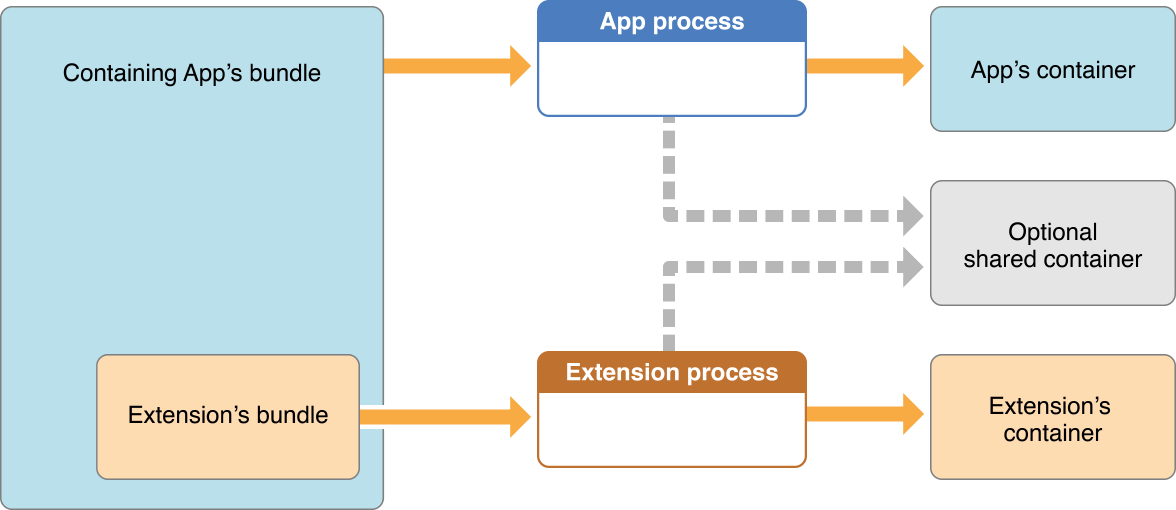
<p>Because the macOS or iOS app and the native app extension each run in their own sandboxed environments, they cannot share data in their respective containers. You can store data in a shared space that both the macOS or iOS app and the native app extension can access and update, by enabling app groups. For more information, see <a href="https://developer.apple.com/library/archive/documentation/General/Conceptual/ExtensibilityPG/ExtensionScenarios.html#//apple_ref/doc/uid/TP40014214-CH21-SW6">Sharing Data with Your Containing App</a>.</p>
</blockquote>
<p>I didn't see this at first, and did a whole bunch of googling, the result of which was often replies to the effect of &quot;use <code>UserDefaults</code>&quot;. The link in that quote does point to a page describing how the app and the app extension run in different sandboxed contexts, and therefore both need to be added to a shared &quot;app group&quot;. This way there is a shared container which both the app and extension can read and write to.</p>
<figure>
  <img src="https://cdn.some.pics/deathau/66d93f2f2a0fb.png" alt="An image showing how the app and extension processes are separate and have separate containers, but can optionally communicate with a shared container as well."/>
  <figcaption><strong>Figure 4-1</strong> An app extension’s container is distinct from its containing app’s container</figcaption>
</figure>
Okay, so... First thing, I have to add in the App Groups capability to each of the targets in my XCode project
![A partial screenshot showing the adding of an "App Groups" capability to the "Signing &amp; Capabilities" of a target in XCode.](https://cdn.some.pics/deathau/66d93f8128d16.png)
Then add in an identifier for the group that will be identical across targets:
![A partial screenshot showing the set up of an identifier for an "App Group" named `my.group.identifier`](https://cdn.some.pics/deathau/66d93fdd9be7b.png)
Side note: I found that for the iOS targets, I had to use `group.` as the first part of my identifier.
<p>Once that is in place, I can modify the native extension code to store the data in the shared User Defaults</p>
<pre><code class="language-swift" data-lang="swift">func beginRequest(with context: NSExtensionContext) {
	let request = context.inputItems.first as? NSExtensionItem
	...
	let message: Any?
	...
	var dict = message as? [String:Any] ?? [:] // assuming I'm sending an object from javascript and not just a plain string
	let defaults = UserDefaults(suiteName: &quot;my.group.identifier&quot;)
	do {
            let jsonData = try JSONSerialization.data(withJSONObject: dict, options: .prettyPrinted)
            defaults?.set(jsonData, forKey: &quot;message&quot;)
        }
        catch {
			// do something with the error?
        }
	...
	context.completeRequest(returningItems: [ response ], completionHandler: nil)
}
</code></pre>
<p>I can also set up an observer in my ViewController like so:</p>
<pre><code class="language-swift" data-lang="swift">class ViewController: PlatformViewController, WKNavigationDelegate, WKScriptMessageHandler {
	override func viewDidLoad() {
        super.viewDidLoad()   
        UserDefaults(suiteName: &quot;my.group.identifier&quot;)?.addObserver(self, forKeyPath: &quot;message&quot;, options: .new, context: nil)
        ...
	}

	override func observeValue(forKeyPath keyPath: String?, of object: Any?, change: [NSKeyValueChangeKey : Any]?, context: UnsafeMutableRawPointer?) {
        if object is UserDefaults {
            // Here you can grab the values or just respond to it with an action.
        }
    }

	deinit {
        UserDefaults(suiteName: &quot;my.group.identifier&quot;)?.removeObserver(self, forKeyPath: &quot;message&quot;)
    }
}
</code></pre>
<p>However, take the above with a grain of salt, because on my machine, it <em>doesn't</em> work. I'm not sure why. The observer never gets triggered, and accessing the User Defaults by a button press or something just returns <code>nil</code> for the &quot;message&quot; key, every time. This is despite being able to retrieve it in the SafariWebExtensionHandler (where it was written in the first place). It even persists between runs!</p>
<p>I can't figure this out. So, on to something else...</p>
<h2>Sending message from (native) extension → app? Please?</h2>
<p>At this point, I could think of only one way to get a message from my extension to my app: A custom url protocol handler. This is far from ideal, as I don't think I can send an entire webpage converted to markdown via url. There's a cap on the length. But, if I can get it working, perhaps there's something else I can do? Maybe write the data to a temp file then notify the app of said file's existence via pinging a url?</p>
<p>Well, either way, to wrap this post up, here's how I managed to get url handling working.</p>
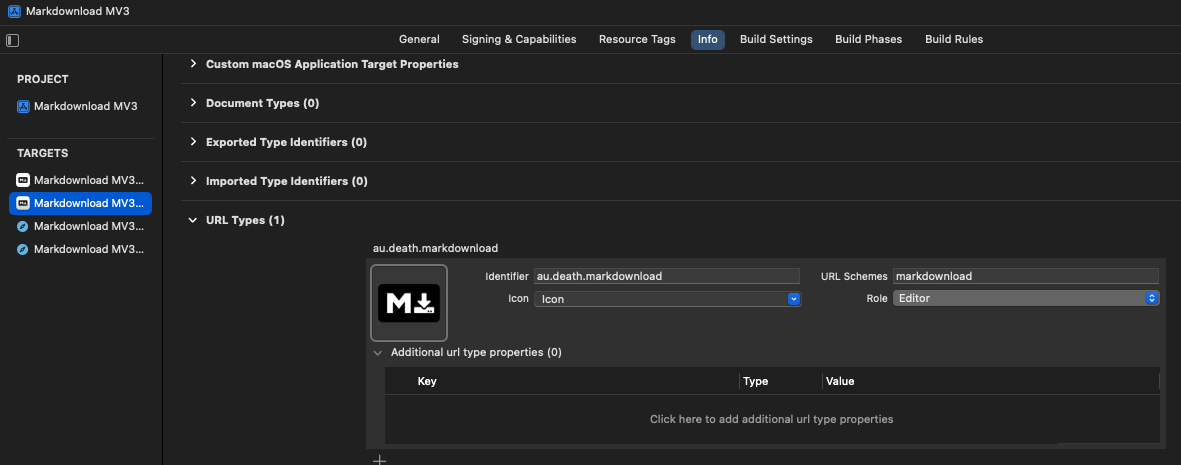
<p>The first step is to update the Info.plist with a new url type. In my case, I chose <code>markdownload</code> as my url scheme
<img src="https://cdn.some.pics/deathau/66d9404ee4cea.png" alt="A partial screenshot showing the setup of a custom  url type for a macOS target in XCode." /></p>
<p>To handle the url, I need to add a function to my AppDelegate. From there I need to get the ViewController, which is theoretically attached to the main window, so I can pass the data there (as is the whole point of this exercise).</p>
<pre><code class="language-swift" data-lang="swift">@main
class AppDelegate: NSObject, NSApplicationDelegate {
	...
    func application(_ application: NSApplication, open urls: [URL]) {
        let url = urls.first
        if(url != nil) {
            let mainVC = application.mainWindow?.contentViewController
            ( mainVC as! ViewController).handleUrl(url: url!)
        }
    }
}
</code></pre>
<p>In the ViewController, I've created that <code>handleUrl</code> function to get data if it receives a url of the form <code>markdownload://message-recieved</code> and fetch the data that was saved in the User Defaults. (As stated above, this isn't working for me, so I'm not actually doing anything with the data apart from forwarding it to the web view, but I thought I'd document it anyway)</p>
<pre><code class="language-swift" data-lang="swift">    func handleUrl(url: URL) {
        print(url)
        var host:String?
        if #available(macOS 13.0, iOS 16.0, *) {
            host = url.host()
        } else {
            // Fallback on earlier versions
            host = url.host
        }
        
        if(host == &quot;message-recieved&quot;) {
            let defaults = UserDefaults(suiteName: &quot;my.group.identifier&quot;)
            let message = defaults?.string(forKey: &quot;message&quot;)
            if(message != nil) {
				defaults?.removeObject(forKey: &quot;message&quot;) // don't need it anymore
				self.webView.evaluateJavaScript(&quot;Messenger.recieveMessage(\(String(decoding: message!, as: UTF8.self)))&quot;) // send it to the webview javascript for processing
            }
        }
    }
</code></pre>
<p>And now that is all in place I can modify the web extension handler to ping the url after adding the data into the defaults</p>
<pre><code class="language-swift" data-lang="swift">func beginRequest(with context: NSExtensionContext) {
	...
	defaults?.set(jsonData, forKey: &quot;message&quot;)
	NSWorkspace.shared.open(URL(string:&quot;markdownload://message-recieved&quot;)!)
    ...
}
</code></pre>
<p>That part of it actually works! I can hit breakpoints in the <code>handleUrl</code> function I made (something I found I <em>can't</em> do in the web extension handler, what with it being a separate process/sandbox)</p>
<h2>First leg complete</h2>
<p>Even though I never really got anything working to the extent I wanted to, I learned a lot in this first leg of my Safari journey. About how Apple handles extensions, inter-process communication... Would you believe I didn't even know Swift before starting this? Thankfully, I did know Objective-C, C# and JavaScript, which Swift feels like a mashup of, so it was easy to follow and understand the code samples provided by Apple.</p>
<p>My code so far is an absolute shambles, and I think I'm going to have to start my &quot;from scratch&quot; branch all over again from scratch. But I've learned, I've grown, and in my googling, I may have stumbled upon an approach that could work for browsers <em>other than</em> Safari, which opens the possibility of bringing whatever app functionality I end up creating to other browsers. We shall see.</p>
<p>For now, I'm tired from cutting through all this jungle, and need to set up camp, have a rest and consult my map and compass before setting out on the next leg of my Safari safari.</p>
</div></content>
    <link rel="alternate" href="https://www.death.id.au/b4.0014/" />
    <summary type="html">As mentioned in my previous blog post, I went down a bit of a rabbit hole regarding native messaging. I couldn&#39;t figure out how to communicate properly via stdin/stdout from a MacOS Swift app. If anyone has any pointers, that would greatly simplify the process; because oh boy is this a process.</summary>
  </entry>
  
  <entry>
    <title>Going on Safari (Prologue)</title>
    <id>https://www.death.id.au/b4.0013/</id>
    <updated>2024-09-03T00:00:00Z</updated>
    <published>2024-09-03T00:00:00Z</published>
    <content type="xhtml"><div xmlns="http://www.w3.org/1999/xhtml"><h1>Going on Safari (Prologue)</h1>
<p>I'm currently working on a complete rewrite of my browser extension, MarkDownload. In the current version, most of my logic and processing takes place on a persistent background page. An invisible webpage, just sitting there taking up memory, waiting for someone to click that button and get the process started.</p>
<p>Google Chrome decided to change all that, and get rid of background pages in favour of service workers, which — long story short — <em>don't</em> persist in the background. They wake up when given certain signals then disappear again. It's certainly not a worse way of doing things, but it's very different to what's working now, so it's a good time to re-think and re-write the entire extension.</p>
<p>One thing that's kind of annoying about the current version is the ephemeral nature of the popup. If you clip a page, make some modifications and then accidentally click off the popup, it's all gone and you have to start over again. Well, Chrome (and most chromium-derived browsers) has a side panel now, and Firefox already had a sidebar, so now seems like a good time to take advantage of all that. There's just one major problem with all this: Safari does not have a sidebar of any sort.</p>
<p>Something else that's at the back of my mind is the image downloading, and especially how it doesn't really work well on Safari browsers. These things are important, because the Safari version of the extension is the only one I charge for (I have to pay for my Apple developer license somehow), but it currently has a worse experience than the free versions.</p>
<p>Due to the way Apple goes about Safari extensions, there is a MacOS app attached to it. The current version of the app is just the templated default from Apple. It's useless. It just pops up a window to tell you the extension is installed and there's a button to quit the app and open Safari's extension options. I've had the idea for a long time that I should be able to fix image downloading on Safari by having that MacOS app somehow handle the image downloads. And also, Safari does not have a sidebar, but I could run that in the native app and have it communicate with the extension — that is the point of having an app attached to an extension, after all.</p>
<p>I started writing this blog post as a way to explain the technical stuff I've learned so far, because the process for getting data between the extension and the app was (and is) not obvious or easy. I have a prototype solution at the moment involving native messaging, webkit message handlers, User Defaults and custom protocol handlers. It's convoluted. But I've waffled on enough about the reasoning that I think this should become a multi-part blog post with the technical stuff separate.</p>
<p>Also, I spy another rabbit hole over there to do with native messaging... If I can elevate the experience for Safari with a native app, could I do the same for other browsers and platforms? Could I offer a paid-for version of a desktop app that enhances the extension's functionality with previously impossible features? Like, at least, the ability to save clipped websites and images <em>outside</em> the download folder (the single most-requested and most impossible feature)?</p>
<p>We shall see. For now, I'm going to do a little more research and tinkering while I write up a more technical blog post on how to achieve what I want. See you then.</p>
</div></content>
    <link rel="alternate" href="https://www.death.id.au/b4.0013/" />
    <summary type="html">I&#39;m currently working on a complete rewrite of my browser extension, MarkDownload. In the current version, most of my logic and processing takes place on a persistent background page. An invisible webpage, just sitting there taking up memory, waiting for someone to click that button and get the process started.</summary>
  </entry>

</feed>